
Online Help
Where does it go?
(Field description follows in the table below.)
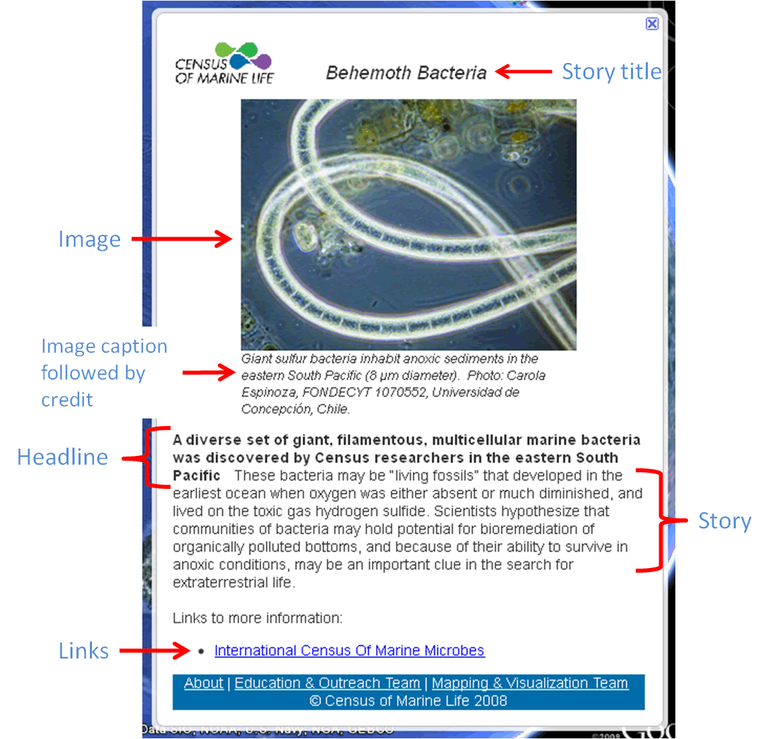
Field description
| Field | Description |
|---|---|
| Theme |
Themes were the original idea we coined to group stories into categories, which would be translated as the folder structure in Google Earth. Unfortunately, themes were taken away in the initial release of Ocean in Google Earth. Thus, this field is not used at this moment. Please choose a theme your story best fits in, anyway, for the future use. |
| Story title | The title appears on the top of the balloon. It also appears as a label when you mouse over the placemark icon. The title should be attractive yet succinct. Do not write a sentence. Two to five words are desirable. |
| Headline |
The headline appears below the image caption in bold font. It is separated from story body with two spaces. Headline leads people to the story. A brief sentence works fine. |
| Story | Be creative. Note that most of Google Earth users are lay person. Use plain words. Most of the text decoration will be stripped away, so don't bother making it fancy. You can use an italic font for species scientific name, vessel name etc. For example, "Humpback whale (Megaptera novaeangliae) migrates from south to north." |
| Links | As the balloon is too small to include everything you want to tell,
providing links is a way to take people to additional information. At least, you should provide a link to your project web page. By default, a link to Census portal is included. You must provide a label for each URL. A label and the corresponding URL must be separated with a ';' (semi-colon). A URL starts with 'http://'. Examples: Mapping and Visualization Team; http://comlmaps.org Photo Gallery; http://yourweb.domain.com/gallery Census of Marine Life; http://coml.org |
| Images | Choose a representative image for the story. The image can be a real photo, diagram, graph, illustration etc. Please make the size of the image smaller than 500KB. Otherwise, it loads very slowly in a balloon, which makes people annoyed. Approximate width of the image in a balloon is 320 pixels (horizontal image) or 300 pixels (vertical image). Keep in mind that browsers and Google Earth are not good at resizing images. You will get better rendering if you use your image editor (e.g. Photoshop, Adobe Fireworks) to resize the image in advance. |
| Image caption |
Describe the image. Try to include what, when, how. |
| Image credit |
Credit line for the image. Please clear all copy right issues. Without a proper credit, the image can not be used. |
| Longitude, latitude, altitude |
If you know the exact coordinates, type in in decimal degrees. Dragging the icon on Google Maps is a convenient alternative. Please zoom in to get enough precision. It would be wise to avoid the same locations as other Census placemarks. Please use Google Earth to make sure your placemark won't overlap others. |
| Contact full name |
Census E&O Team will contact you when questions arise. Your name won't appear on the balloon, though. |
| Contact email |
Same as above. |
| Project |
Your Census project name (e.g. TOPP, NaGISA, CenSeam). This is a reference purpose only. |
| Supervisor name |
Census E&O Team may contact the supervisor (usually project PI) to double check the story detail. |
| Supervisor email |
Same as above. |
